 |
WebKit API Documentation |
 |
WebKit Transaction Control
Both dynamic HTML generation and forms processing can be regarded as a series of transactions. WebKit provides a way of describing each of these transactions and a control program which executes the transaction. Each transaction is described in a record in the WKCONTROL file and the program which executes the transaction is HTMLForms.
A WKCONTROL transaction consists of a series of steps that either output static HTML that is stored in a file, or that generate HTML as the result of executing a command. For example, a simple form generation transaction might consist of three steps:
- output static HTML that defines the header and some static text, as well as the FORM and SUBMIT button tags
- output the controls needed to input data into the specified fields of a file
- output static HTML that ends the form.
The transaction that processes that form might consist of four steps:
- update the file with the new input data
- output static HTML that defines the header and some static text that acknowledges the processing of the form
- output the new data record information as confirmation of what was entered
- output static HTML that closes the confirmation page
WKCONTROL File
To create a WKCONTROL transaction, you start by defining the steps of the transaction in a WKCONTROL record, then you implement the paragraphs, sentences, and dictionary entries that are called by the WKCONTROL steps. A WKCONTROL record has the following structure:
- HTML File - the name of a uniVerse file entry for a Type 1 or 19 file that contains the static HTML segments
- Description - a short description of the transaction
- Segment Type, Information, and Error- multi-valued association specifying each step in the transaction.
Currently the following segment types are supported:
| Type | Information/Error |
|---|---|
| ADDRGS | command to execute. Postargs are passed via named common strings of the form &xxx are replaced with the value of argstring variable named xxx before executing. Strings of the form &^xxx are replaced with UPCASE() of value. Each line of output is placed on the front of argstring. Each line should be of the form nnnn or nnnn=xxxx |
| BRANCH | switches to the transaction control returned by execution of the command in segment info. Command line substitution is performed on the segment info before execution. If output of command is "", then control is passed to the next segment (no branch). |
| COOKIE | Specifies cookie parameters to be inserted in the header name=value;expires=dotw, dd-mon-yyyy hh:mm:ss GMT ;path=path;DOMAIN=domain; [secure] default domain is sending server, default path is path of doc default expires is life of browser session. GMT is only valid tz. |
| ENCODE | command to execute - output is CGI encoded |
| GENID | command - name of a command that will generate on standard out a record ID for the incoming data. |
| HEADER | HTTP header record to insert in output stream Note: Use the character "|" or a sub-value mark to insert a carriage return on output. (Useful for MIME types) outputs a null line following header. SegmentInfo subject to CommandLineSubstitute (see below) |
| HTML | name of record in form file containing static html |
| IEXECUTE | same as REXECUTE except command is chained to so all output is under control of command. Used for HTMLFile output |
| LITERAL | inline text to insert in output stream Note: Use a sub-value mark to insert a carriage return on output. (Useful for MIME types) if SegmentInfo contains @ErrorMsg then the contents of the internal variable ErrorMsg is output. SegmentInfo subject to TextSubstitute (see below) |
| REQUIRED | names of controls that must be present in argstring and contain non null value. If not then if ERROR transaction is specified, control is passed to it. Otherwise an error message is generated and the transaction is terminated. |
| REXECUTE | command to execute, Post args are passed via named common SegmentInfo subject to CommandLineSubstitute (see below) |
| SAVEARGS | field number to save argstring in. For debugging, this will save the raw argstring in the field in record specified by @ID of file specified by @FILENAME |
| SHTML | name of record in form file. Each line is subject to TextSubstitution (see below) The SegmentInfo is subject to TextSubstitute.(See below) |
| VALIDATE | executes a validation routine and puts the resulting value on to the argument string as @AuthLevel=n if value returned is 0, it issues an error message and aborts. SegmentInfo subject to CommandLineSubstitute (see below) |
| CommandLineSubstitute: TextSubstitute: |
strings of the form &xxxx (&^xxxx) are replaced with the value of argstring variable xxxx (upcased value of argstring variable xxxx for &^xxxx) x is alphameric or . - _ characters if value contains spaces it is quoted before substitution. If xxxx is not in argstring or is empty, the string is deleted, unless the next character after xxxxx is ";" if next characters after xxxxx are "\&", they are deleted from output. This lets you substitute a value before a alphameric or one of the characters ".-_" E.g. If argstring contains Type=blue and SegmentInfo (or html segment) contains Filename=&Type\&.txt the output is Filename=blue.txt TextSubstitute is the same as CommandLineSubstitute except value is never quoted. |
HTMLForms
HTMLForms is the transaction control program. It normally takes one parameter, the name of the WKCONTROL record that defines the transaction to execute. For forms processing the POST method argument string is passed to WKCONTROL in standard in.
HTMLForms steps through the segments defined in the specified WKCONTROL record, collecting the HTML generated by each step. At the end of the steps, it makes sure that the HTML output contains a valid HTTP header, supplying the default text/html header if necessary, and then it passes the HTML back to the server as the result of the transaction. HTMLForms eliminates the need to put header generation and HTML output printing in each of the routines that make up an application.
The functioning of each type segment is best described by looking at the Customer Action Request application that comes with WebKit.
The Customer Action Request Application
The standard Customer Action Request (CAR) application that comes with WebKit uses WKCONTROL transactions. Basically, the CAR application consists of two transactions:
- Generate a CAR form from some of the fields in the CAR file
- Process a CAR entry from that form.
The WKCONTROL record for the form generation transaction looks like this:
| Type | Info | Error |
|---|---|---|
| HTML | cargen.pre | |
| EXECUTE | HTMLDataEntry CAR "" ENTRY | |
| HTML | cargen.post |
This WKCONTROL record says that the static HTML files needed for this transaction are to be found in the uniVerse file WKFORMS. The HTML generated by the transaction consists of a static HTML segment named cargen.pre in WKFORMS, the output of the HTMLDataEntry command, followed by a static HTML segment named cargen.post in WKFORMS. To execute this transaction you would use a URL of the form: http://www/bin/wkf?CAR.REQUEST.GEN. This will result in the execution of the command "HTMLForms CAR.REQUEST.GEN" in the production WebKit account.
Let's look at the components:
cargen.pre
<HEAD>
<TITLE>Multi-Media Communications Customer Action Request Form</TITLE>
</HEAD>
<BODY BGCOLOR=#FFFFFF>
<h3 align=center><img src=/images/header.gif><br>
Customer Action Request(CAR Form</h3>
<FORM METHOD=POST ACTION="/bin/wkf?CAR.REQUEST.PROCESS">
Please enter the requested information and click on this
<input type=submit value=" Submit Request "> button.
<HR> You must enter your email address to get a reply.<HR>
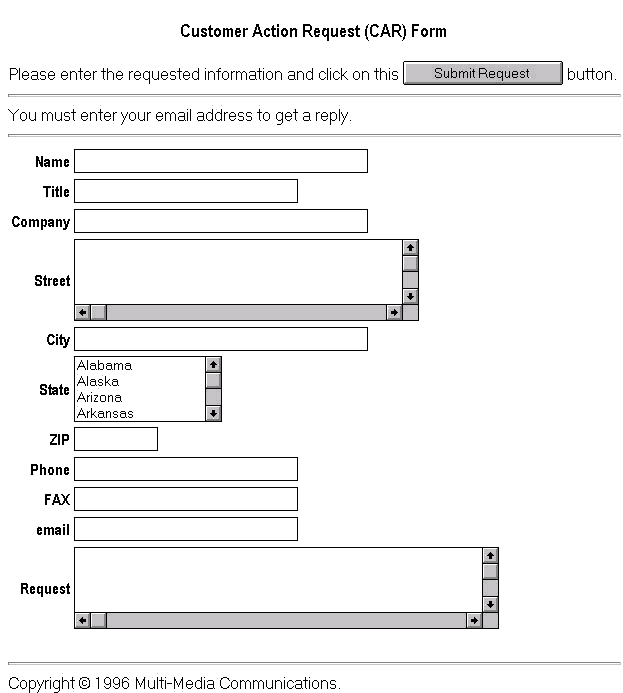
This static HTML segment contains the front part of the form, including the title, background, image and other components that give the page its look and feel. It also contains the FORM tag which specifies the WKCONTROL transaction which will process the form. The submit button must be specified without a name.
cargen.post
</FORM> <HR>Copyright © 2001 Multi-Media Communications Internet Services. </BODY> </HTML>
cargen.post very simple. It just provides the closing tags for the form, the body, and the whole HTML page, and a simple copyright notice.
These html segments are generated from a single HTML file that contains markers that tell the utility UTILWKSplit how to break it up. This lets you design the html using your favorite WSYWIG HTML editor.
The source for the two segments would be in a file named cargen.htm in WKFORMS and would look like:
<HEAD> <TITLE>Multi-Media Communications Customer Action Request Form</TITLE> </HEAD> <BODY BGCOLOR=#FFFFFF> <h3 align=center><img src=/images/header.gif><br> Customer Action Request(CAR Form</h3> <FORM METHOD=POST ACTION="/bin/wkf?CAR.REQUEST.PROCESS"> Please enter the requested information and click on this <input type=submit value=" Submit Request "> button. <HR> You must enter your email address to get a reply.<HR> <p>%WEBKIT%cargen.pre%</p> </FORM> <HR>Copyright © 2001 Multi-Media Communications Internet Services. </BODY> </HTML>
To split this into cargen.pre and cargen.post you would run the following command:
UTILWKSplit WKFORMS cargen.htm
Whenever UTILWKSplit sees a line with %WEBKIT%nnnnn% on it, it outputs everything it has read so far to a file named nnnnn in the specified Type 1 or 19 file. At the end of the file it creates a file named xxxxx.post where xxxxx is the basename of the input file (e.g. cargen.htm has the basename cargen.). The entire line containing the %WEBKIT%nnnnnn% is discarded. We generally put it in <p> tags so the editor knows not to combine it with the line before or after.
HTMLDataEntry
The interesting part of the form, the input controls, are supplied by executing the command "HTMLDataEntry CAR '' ENTRY". HTMLDataEntry generates forms controls for the fields specified by the phrase ENTRY, for a new record in the CAR file. The ENTRY phrase in the dictionary of the CAR file contains:
ENTRY
0001 PH
0002 NAME TITLE COMPANY STREET CITY STATE ZIP PHONE FAX EMAIL ACTION.REQUEST
The Resulting Form
Here is what the resulting form looks like (minus the image for the sake of space):
Processing the Form
When the CAR form is filled in and the submit button pressed, the action specified by the static HTML segment carpre.html, is another WKCONTROL transaction: CAR.REQUEST.PROCESS. Here is what this transaction looks like:
| Type | Info | Error |
|---|---|---|
| HTML | carconf.pre | |
| REQUIRED | EMAIL ACTION.REQUEST | |
| ADDARGS | HTMLGenID -A -D CAR | |
| REXECUTE | CAR.ENTRY.CONFIRM &@ID | |
| HTML | carconf.post |
This WKCONTROL record says that the response to the CAR entry request is some static HTML, this time in carconf.html. The REQUIRED entry tells HTMLForms to look for controls with names EMAIL and ACTION.REQUEST in the POST argument string and that these arguments must have non empty string values. If the specified controls are not present or contain the empty string as values, then HTMLForms will abort by generating a standard "Required fields not present" message, listing the missing fields. So the static HTML segment comes first to set the look and feel for either the error message or for successful confirmation.
The ADDARGS segment executes the specified command which puts a @ID=newID name-value pair into select list 1. HTMLForms takes it from select list 1 and prepends to the POST argument string for use by subsequent steps. The execute of HTMLDataWrite updates the new record with the values passed back in the POST argument string, creating the record with the just generated newID. The next two steps substitute the value of the ID from the @ID control in the POST argument string, and then execute the specified command with the ID as the argument.
PA Write out CAR data and mail notification

* arguments @ID
HTMLDataDisplay CAR <<C2>> @ID ENTRY
HTMLMail -s "CAR Entry Notification" -r "mdj@mmcis.com"
  "webmaster@mmcis.com" "LIST CAR <<C2>> ENTRY HDR.SUP COUNT.SUP"
Here is what those commands do:
HTMLDataEntry just lists the new entry, displaying the fields that were in the form.
HTMLMail sends email to mdj, with the body of the email a listing of the new entry. The subject and reply to of the mail is set to "CAR Entry Notification" and mdj@mmcis.com, respectively.
The HEADER Segment Type
The HEADER segment type can be used to generate HTTP headers for documents that are not HTML. For example, this transaction generates a comma delimited file for downloading. By specifying a header that is not recognized by most browsers, it will force the browser to display the save file dialog. Here we specify a mime type that is usually mapped to Excel so the file would be loaded directly into Excel from the browser. The WKCONTROL record for this transaction is:
| Type | Info | Error |
|---|---|---|
| HEADER | Content-type: text/csv;filename="car.csv"|Content-Disposition: inline;filename="car.csv" | |
| REXECUTE | CAR.DOWNLOAD &TYPE |
The EXECUTE segment generates the comma delimited file by using a utility routine called UTILDownLoadCSV.
CAR.DOWNLOAD
PA - Download CAR file entries
* arguments ALL|LATEST
IF <<C2>> = "ALL" THEN GO ALL
SELECT CAR WITH CAR.TYPE = ""  BY.DSND CAR.DATE BY.DSND CAR.TIME
   WITH NO DOWNLOAD.DATE TO 1 COUNT.SUP
GO DL
ALL:
SELECT CAR WITH CAR.TYPE = ""   BY.DSND CAR.DATE BY.DSND CAR.TIME TO 1 COUNT.SUP
DL:
UTILDownLoadCSV CAR CONFIRM
Where CONFIRM is a phrase that defines the fields to be downloaded.
CAR Summary
So the combination of the control functions of HTMLForms stepping through a transaction specified in the WKCONTROL file allows you to do a fairly common operation of generating a form from a file, and processing it, including checking for required fields without having to write any custom BASIC code. The utility routines, like HTMLMail and HTMLGetID are fairly small routines that can be used in a variety of situations.
The Tracker Club Sample Application
WebKit comes with a sample application which demonstrates the power and ease of use of the WKCONTROL transactions. The starting point for the application in a simple menu pages with three links on it. Click on the logo to get to the menu.
