WebKit consists of uniVerse account information, BASIC programs, RETRIEVE and uniVerse SQL reports, and a collection of shell scripts, UNIX executables, and various HTML text and graphics files. WebKit is designed to be installed on a production system using at least two uniVerse accounts.
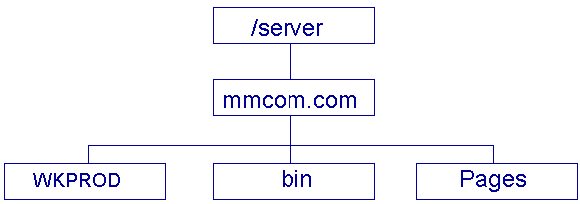
WebKit is delivered as a single uniVerse account with subdirectories (Type 19 files) that contain the HTML text and graphics, shell scripts, and executables. The standard setup is to install the source account, named WEBKIT, in an account that is owned by the user id of the httpd server. The server files are installed in a directory structure that looks like
The Pages directory is the server root for URLs, the bin directory is a CGI directory that contains the scripts to be executed, and the WKPROD (or whatever you name it) directory is the production WebKit accoun
The httpd server must be configured so that URLs starting with /bin are mapped to the bin directory, those starting with /WKIMAGES are mapped to the production WKPROD/WKIMAGE directory, and those starting with /WKFORMS are mapped to the production WKPROD/WKFORMS directory. Typically, the /WKFORMS pages are password protected so that only authorized users can perform the administrative tasks.
The production WebKit account is setup by creating a new uniVerse account in the proper place. Then run the paragraph WKPREP from the source WebKit account, specifying the production WebKit account name. WKPREP will create the necessary files and copy the necessary records into the production account. The exceptions to this are:
These actions must be done manually so that WKPREP can be run again without destroying any information local to the production account.
The bin directory is populated by copying the following files from the WKSCRIPTS file in either the source or production account:
The server needs to be configured so that there is an alias path for /bin/* to the production account WKPROD/WKSCRIPTS/*
All commands processed by WebKit must be authorized for execution by including them in the HTMLValidCommand record in VOCLIB in the production WebKit account. Each field in the HTMLValidCommand record is either a complete command, like DATE or LIST, or a command prefix followed by three periods, like HTML… or ACCESS…
Each applet or set of routines has a main data file and a program file that have the same prefix. All commands for that applet will start with the same prefix. For example, the main file for Customer Action Request processing applet is CAR, the program file is CAR.BP and some of the commands are CAR.OPEN.REPORT, CARWrite, etc. Names of the form APPLET.XXX.XXX are usually uniVerse paragraphs or sentences while names of the form APPLETAction are usually cataloged BASIC programs, subroutines, or functions.
Program files contain source records with either a .B suffix (code files) or a .H suffix (include files). There is also a MAKE.MK record which is the makefile for the applet.
Makefiles are generated and maintained using the MKMAKE utility. The source for MKMAKE is in UTIL.BP/MKMAKE.B. The calling sequence for MKMAKE is
MKMAKE BPFilename SourceRecord CatalogName dependson …where:
MKMAKE CAR.BP FOO.B CARFoo CAR.H H.H
The standard way that make is invoked is to create a VOC entry of the form:
MAKEC:
001: S - Make command for CAR.BP file
002: SH -c "make -f CAR.BP/MAKE.MK"
The command "MAKEC ALL" would then make the out of date targets, and catalog them locally for debugging. "MAKEC GLOBALCATALOG" would globally catalog all targets so they can be seen by the production account.
All references to uniVerse file fields in BASIC code is via EQUATEd field numbers. For each data file referenced in an applet, the program file contains a .H file that is generated using the GENEQU utility.
GENEQU BPFileName DataFileName
The source for GENEQU is in UTIL.BP/GENEQU.BP
The default make rule for a BASIC program compiles the program and catalogs the result locally. Once the program has been debugged, you must catalog it globally (normally) so that it will be used by the production account. There is a GLOBALCATALOG target defined in every MAKE.MK file that will globally catalog every program in the applet.
Normally access via WebKit to operational data or more extensive applications written specifically for Web access would be done by creating a separate application account and linking to the data files with Q pointers and globally cataloged commands. All the paragraphs and sentences associated with the application must be in the production WebKit VOC however.