
Registering a Domain MMCIS Will Manage
There are many different registrars for domain names these days, and each one has a different procedure for registering a domain name. However, all of them require 3 pieces of information that must be entered correctly for MMCIS to manage the domain: technical contact, and the primary and secondary name servers. Use the following to specify these correctly.
- Technical contact:
MMCIS should be specified as the technical contact using the following information (not all registrars will ask for all of these fields).
- Primary and Seconday Name Servers
name server name IP address Primary ns1.mmcis.com 155.212.12.23 Secondary ns2.mmcis.com 155.212.12.11 Tertiary ns3.mmcis.com 34.202.70.26
| Contact | Webmaster |
| Company | MMCIS, Inc. |
| Address | PO Box 726 Hudson, MA 01749 |
| Phone | 978 562-7833 |
| FAX | 508 302-1064 |
| webmaster@mmcis.com | |
| Type | Role (as opposed to individual) |
Please forward any email confirmation from the registrar to webmaster@mmcis.com.
Network Solutions Detailed Help:
For changing the Name Servers:
-
Display the account details and then click on the edit link to the right of the "Designated DNS" line for "Domain currently points to:"
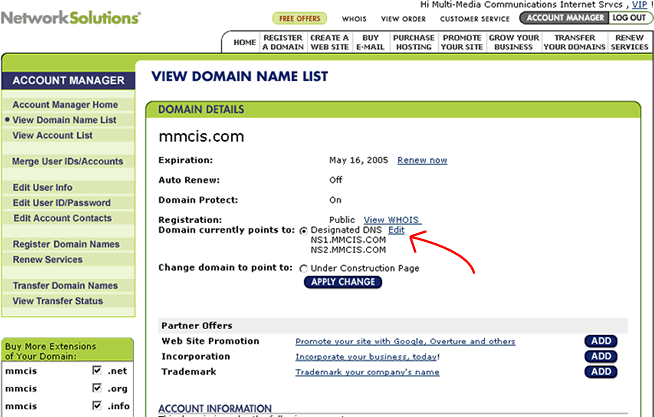
-
Then click on Continue under the Move DNS to new server box.
-
Click Continue on the Confirm screen
-
Enter the following for name server 1 and 2, respectively: ns1.mmcis.com and ns2.mmcis.com